





Even minor updates often trigger unexpected failures in critical flows such as login or checkout. In complex systems, these dependencies mean that a fix in one area can break functionality elsewhere, making software regression testing essential for release confidence.
Software regression testing serves as a safety net, validating updates against existing features to ensure system stability while maintaining delivery speed. For example, after an update to the checkout flow, teams use regression tests across Global App Testing’s real-device network to confirm that payment processing and order confirmation work correctly across supported devices, regions, and operating systems. Performing regression checks after every update helps teams minimise release risk and safeguard key functionality.
This guide covers software regression testing types, essential tools, and practical best practices for maintaining quality throughout the development lifecycle.
What is a regression test, and why is it essential?
Software regression testing verifies that recent changes have not affected existing functionality. This process helps teams detect breakages early and maintain system stability across releases.
Here’s why regression testing matters:
- Reduces the cost of change: Catching regressions early limits rework, avoids emergency fixes, and prevents expensive post-release patches.
- Prevents production issues: Spots defects early, minimising user impact and decreasing the effort required from customer support.
- Supports fast, predictable releases: Reliable regression coverage helps teams accelerate releases without compromising quality in Agile and CI/CD pipelines.
- Helps retain customers: Thorough regression testing helps businesses retain customers by ensuring that new release code does not introduce bugs in existing features. Take the example of our teams working with Canva. They helped retain customers in new markets through end-to-end regression testing.
Regression testing ensures development continues without disruptions by detecting side effects from updates.
How does regression differ from retesting?
Retesting confirms a specific fix works, whereas regression testing checks that recent changes haven’t broken any existing functionality across the system. The comparison table below summarises these differences.
|
Aspect |
Retesting |
Regression testing |
|
Scope |
Narrow: Focuses on a single defect or specific issue |
Broad: Covers all affected areas across the system to ensure overall stability |
|
Purpose |
Confirms a specific fix works |
Ensures updates don’t break existing features |
|
Timing |
Runs right after the team fixes a defect |
Occurs during regular test cycles or after code changes |
|
Focus |
Accuracy of the fix |
Stability and quality of the complete application |
|
Automation |
Usually manual |
Often automated, especially for repetitive and stable workflows |
|
Priority |
High priority for the specific fix |
Prioritises critical workflows, high-risk areas, or frequently used features |
|
Test Cases |
Specific to the defect or issue |
Covers a suite of tests to validate affected and core functionalities |
In our experience with customers, understanding this difference allows our QA teams to plan testing efficiently, ensuring fixes work while maintaining overall system stability.
Types of regression testing explained
The scope of software regression testing varies by release size, system risk, and timelines. Choosing the right approach balances coverage and speed.
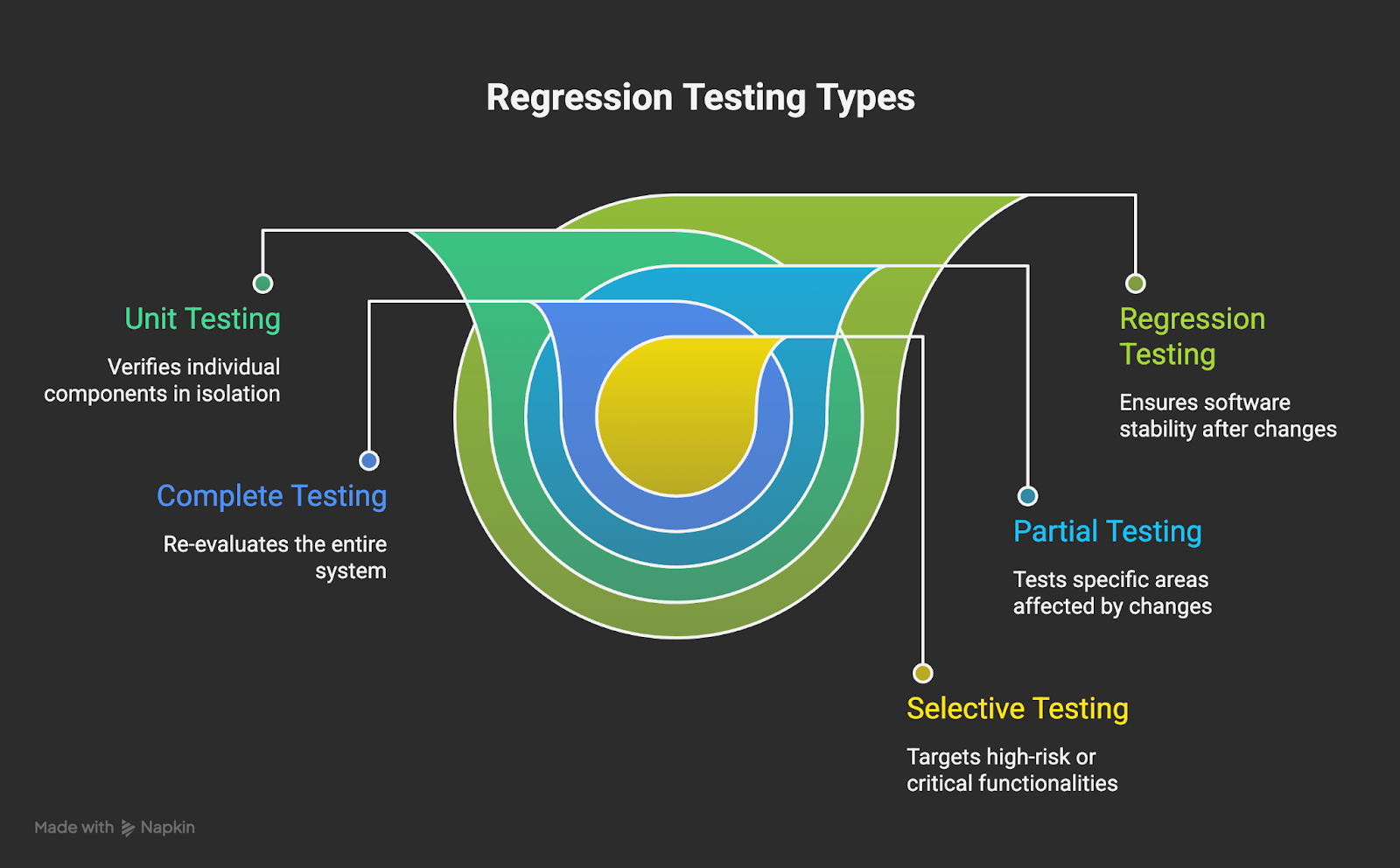
Key regression testing types at a glance
Unit regression testing
Validates individual components early, often automated within CI workflows, to catch issues before they affect integrations. For example, login function updates are verified for edge cases before broader testing.
Partial regression testing
Targets only modules affected by recent changes, maintaining efficiency while ensuring key functionality remains stable. When a checkout flow adds a discount feature, only the payment, order summary, and receipt modules are retested.
Complete regression testing
Covers all features and workflows, ensuring stability ahead of significant releases. Teams run tests across real devices, OSs, and network conditions to confirm core journeys remain intact.
Selective regression testing
Prioritises high-risk areas based on recent changes. After an API update, authentication and data-access tests are rerun across supported devices to mitigate risk.
Progressive regression testing
Validates that new features integrate without breaking existing functionality, a common practice in continuous delivery. For instance, adding voice notes triggers checks on chat, notifications, and media sharing.
Selecting the right regression approach ensures teams maintain stability, reduce risk, and deliver reliable software efficiently.
When should you perform regression testing?
Regression testing is performed after new features in a release are tested. Teams rerun previous test cases to ensure that recent changes haven’t broken any existing functionality.
Common triggers include:
- After a bug fix or code enhancement
- Before production deployment
- At sprint or release checkpoints
- Following integration with third-party systems
- After environment or configuration changes
- In case of version updates for any packages, third-party integrations, or tools
QA teams in agile environments perform continuous regression testing to detect potential issues early, ensuring that new updates don’t disrupt existing functionality. They combine automation for frequent builds with manual checks for critical flows to maintain stability and quality.
For example, after integrating a new payment gateway, teams validate checkout, account, and related features to identify issues before release, reducing post-launch fixes and safeguarding user experience.
Manual vs automated regression: which is better?
The regression testing approach at GAT depends on test stability, execution needs, and available resources. Stable, high-impact workflows are automated, while manual testing validates exploratory or UI-intensive scenarios, helping to deliver quality, consistent releases.
|
Area |
Manual regression |
Automated regression |
|
Execution Speed |
Slower |
Fast and repeatable |
|
Coverage |
Limited by available time |
Broad and scalable |
|
Maintenance |
Low upfront effort |
Requires regular updates |
|
Best suited for |
Exploratory or UI-heavy scenarios |
Stable core flows and repetitive tasks |
|
Fit for CI/CD |
Limited |
Strong |
|
Cost |
Lower initial cost, higher long-term effort |
Higher initial investment, lower cost over repeated runs |
Exploratory checks and visual testing benefit from manual regression, while repetitive, stable workflows are best automated. Check how our team helped Flip cut 1.5 weeks of regression testing by embedding manual with an automated crowdtesting approach.
Tools for regression testing: what are the options?
Teams can ensure thorough regression coverage by combining automation frameworks, test management tools, and CI/CD integration. Common tools include:
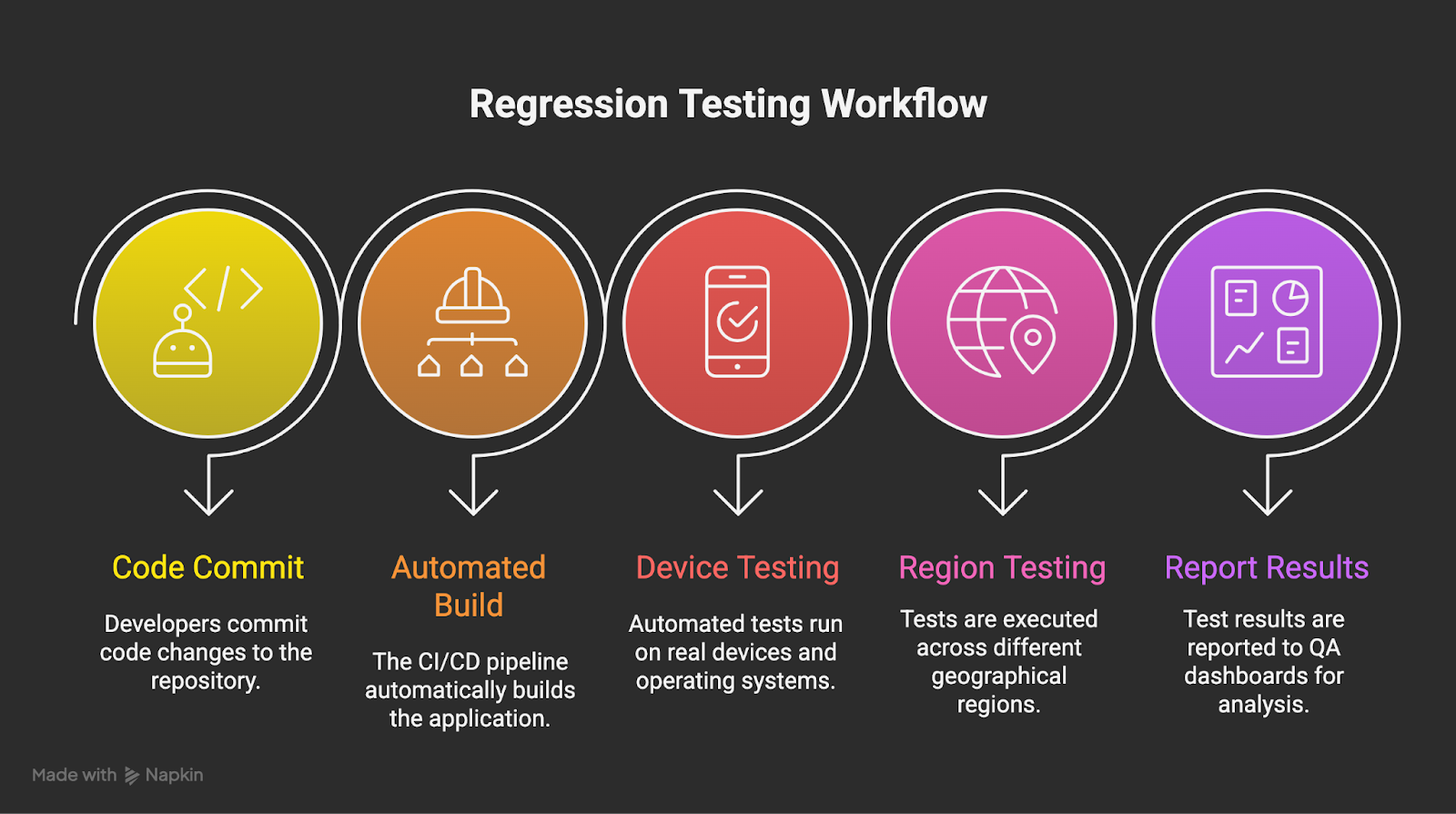
Testing across real devices and CI/CD pipelines
Automation frameworks
- Selenium: Open-source web automation tool.
- Cypress: Lightweight tool for modern JavaScript frameworks.
- JUnit (Java unit testing) / NUnit (.NET unit testing): Unit-level regression tests.
- TestComplete: Supports both scripted and scriptless automation.
- UFT (Unified functional testing): Enterprise automation for complex applications.
CI/CD & management tools
- Jira / testRail: Organise and track test cases.
- Jenkins / GitLab CI/CD / GitHub actions: Automate test execution.
- Real device networks: Validate software behaviour across real devices, OS, and regions.
Teams pair automation with CI/CD execution and real-device coverage to confirm that core workflows behave consistently across environments before issues reach users.
How to automate regression tests effectively
Automation streamlines regression testing by catching defects early, reducing manual effort, and supporting reliable releases. To maximise its impact, teams should follow a structured approach that balances coverage, stability, and speed.
- Start with workflows that would block releases or damage user trust if they fail.
- Automate test cases that remain stable across releases to avoid constant rework.
- Standardise environments and test data to reduce false failures.
- Integrate regression checks into CI/CD to detect issues before they reach later stages.
- Monitor execution results to spot flaky tests and coverage gaps.
- Phased automation rollout helps teams manage test reliability and coverage.
- Review and refine the suite regularly to keep execution fast and relevant.
Applied consistently, these practices ensure regression automation remains stable, scalable, and aligned with real release risk.
Building a regression test suite: best practices
A regression suite delivers real value only when it is focused, maintainable, and aligned with the workflows that matter most. Teams should prioritise tests based on risk, user impact, and feature usage to ensure that critical paths are always validated first.
Key practices include:
- Address high-risk scenarios upfront: Focus on the most important user journeys and frequently used features to reduce the chance of major defects reaching production.
- Review and update regularly: Outdated or irrelevant tests should be removed or updated every sprint or month to avoid wasted effort and misleading results.
- Balance automation with manual testing: Automated checks are ideal for stable, repeatable workflows, while manual testing is better suited for visual validation, usability, or complex edge cases. This maintains both coverage and context without sacrificing accuracy.
- Perform routine clean-up: Eliminate duplicate or low-value tests to speed up execution and make failures easier to analyse.
- Ensure clear pass/fail criteria: Every test should have consistent, unambiguous outcomes to catch real defects rather than noise.
When managed well, a regression suite not only improves feedback speed and release stability but also helps teams scale testing efficiently. However, as the suite grows, practical challenges can arise, so ongoing review and refinement remain essential.
Common challenges of regression testing
Regression testing is essential for reliable releases, but operational challenges can slow teams as products grow.
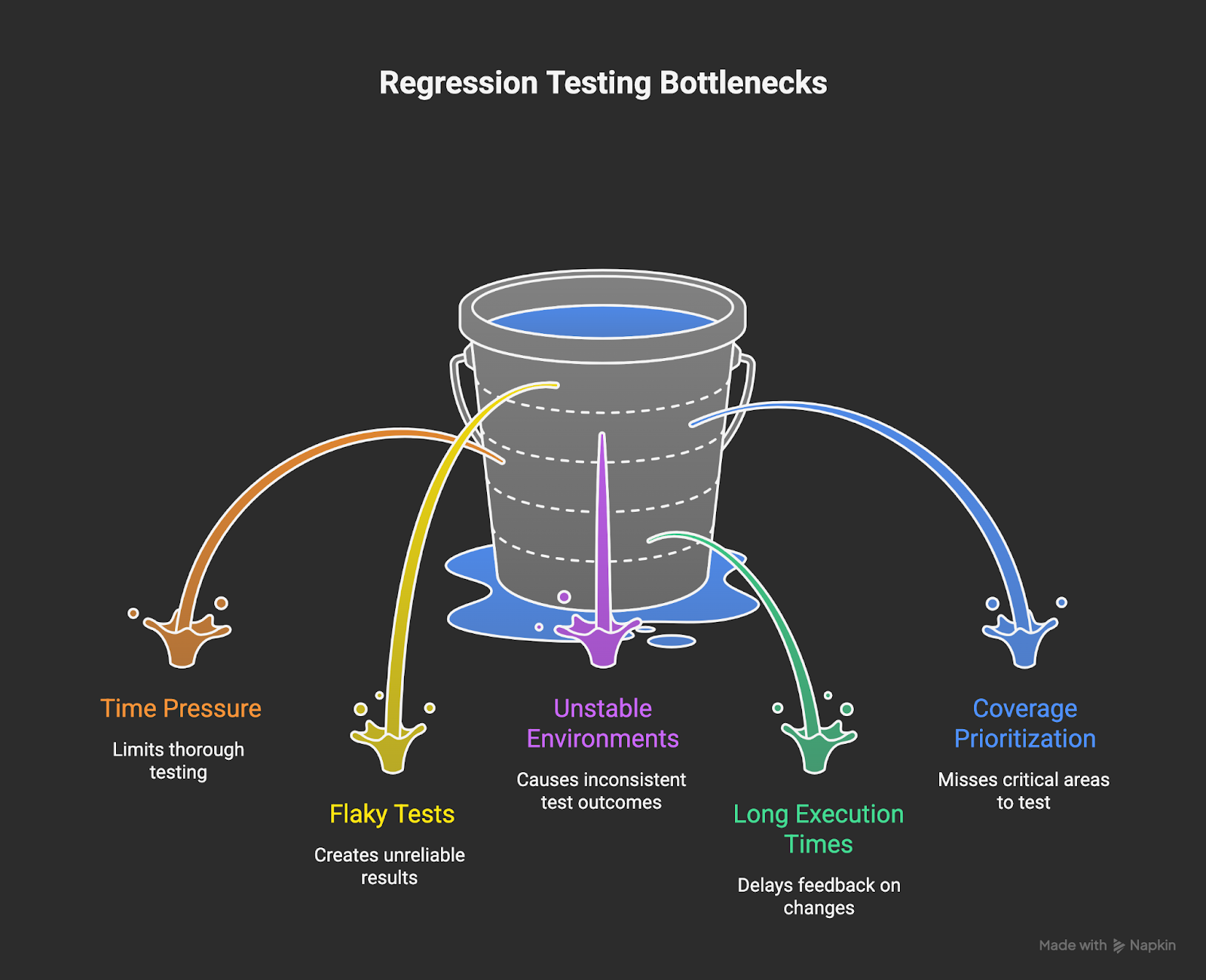
Key challenges in regression testing
Key challenges QA teams face include:
- Time pressure from rapid release cycles: Shorter sprints leave limited time for full regression coverage, which can lead to skipped checks or releases with known gaps.
- Flaky tests and inconsistent results: Unstable tests may fail without any real defects, particularly in automation. This erodes trust in test results and slows triage and fixes.
- Unstable or limited test environments: Mismatched environments or shared test data can cause unreliable failures, making defects harder to reproduce and validate with confidence.
- Growing test suites with long execution times: As features accumulate, regression suites expand without proper pruning, delaying feedback and slowing release decisions.
- Difficulty prioritising coverage at scale: Not all tests carry the same business or user risk. Low-value tests can consume time while high-impact areas remain under-tested.
To manage these challenges, QA teams take a more targeted approach:
- Automate stable, high-value workflows: Focus automation on repeatable paths that block releases if broken.
- Prioritise tests by risk and usage: Align regression coverage with real user behaviour and business impact.
- Run tests across real devices, regions, and networks: Distributed testing surfaces issues that controlled lab environments often miss.
- Embed crowdtesting for faster execution at scale: Teams use crowdtesting vendors to reduce execution time for large test suites. For instance, booking.com reduced 70% of its testing time with global app testing QA teams.
Properly implemented regression testing maintains product quality and keeps releases on track, even as system complexity increases.
Benefits of regression testing in agile development
When changes happen often in agile teams, regression testing helps maintain stable releases and fast delivery.
Key benefits include:
- Protects core functionality across frequent releases
- Regression testing ensures that critical user flows continue to work as teams introduce new features.
- Result: Teams avoid breaking high-traffic paths while iterating quickly.
- Detects defects early, when resolving them is less costly
- Spot issues near the source of change, rather than later in the release cycle.
- Result: Less rework, lower defect expenses, and fewer urgent fixes
- Enables faster and safer deployments
- Reliable regression coverage gives teams confidence to release on shorter timelines.
- Result: Continuous delivery becomes predictable instead of risky.
- Improves collaboration across QA, engineering, and product
- Shared regression results create a standard view of release readiness.
- Result: Clearer decisions, fewer handoff delays, and better alignment on risk.
- Supports global releases with real-world validation
- Testing on actual devices and networks across regions mirrors the real user experience.
- Result: Fewer post-release surprises in new markets and platforms.
Embedding regression testing into agile processes allows teams to deliver updates confidently, maintain quality, and scale releases without increasing risk.
Key takeaways
Software regression testing is essential for keeping systems stable as software evolves. Choosing the right regression approach and balancing manual with automated testing helps teams reduce risk while keeping releases on schedule. Embedding checks into release workflows, using strong tooling, integrating with CI/CD pipelines, and covering real-world devices all boost confidence across platforms and regions. When handled effectively, regression testing becomes a long-term safeguard that ensures consistent quality and dependable releases at scale.
Talk to Global App Testing to ensure your software works flawlessly across devices and regions. Leverage our real-world device network and global QA teams to uncover region-specific issues, compatibility gaps, and release risks that internal test environments may miss.