





Imagine a test suite that fails on Monday, passes on Tuesday, and fails again on Wednesday, without a single line of code changing. Engineers rerun the pipeline, unsure whether they’re chasing a real bug or just another flaky test that produces inconsistent results without any code changes.
Over time, these inconsistent results question trust in automation and impact releases. This is exactly the kind of challenge the Google team has faced, where flaky tests can block builds even when there’s no real issue.
In AI automation testing, the problem becomes even more pronounced. False positives, test failures that do not correspond to real defects, arise from subtle UI changes, environmental differences, or unstable test data.
This causes tests to fail even when the system behaves correctly, resulting in an overwhelming number of misleading failures that clutter CI pipelines and distract teams from genuine defects.
In this blog, we explore the top five causes of false positives in test automation and how AI can help address them.
Top 5 false positives in AI-driven automation testing
Picture an e-commerce app during a seasonal sale. AI automation runs through the checkout flow and flags a failure because the “Recommended Products” section shows items different from those expected.
In reality, the system is working correctly as those recommendations are dynamically personalized based on user behavior. Still, the test marks it as a defect. This is called a false positive.
QA engineers at GAT have listed the top 5 false positives that they face in AI automation testing. Let’s take a look at them:
1. UI change detection errors
Sometimes, automated test cases use brittle locators such as absolute XPath expressions or position-based selectors that break with even minor UI changes. As a result, tests may fail even though the functionality remains intact, incorrectly flagging a defect.
2. Cross-environment inconsistencies
Automation tests can sometimes pass in one environment but fail in another. These false positives often arise from differences in network or system performance.
For example, the test script fails because it waits 2 seconds for the page to load, but the page actually takes five seconds.
3. Cross-device and browser inconsistencies
Most applications today need to work on both web and mobile screens of different form factors. Moreover, applications need to work seamlessly on different browsers and OS. The AI script may only ensure the feature works in a specific browser, and users might encounter failures on their devices.
For example, AI scripts check for the presence of the button on screen, but clicking the button on a specific mobile application form factor does not work.
4. Over-sensitive AI validation
Deciding which assertions to add in automation is critical. In AI automation, relying solely on hard assertions can cause tests to fail and become oversensitive.
For example, login fails because the email field title has different spacing than expected. This failure doesn’t indicate a functional failure but a UI failure, yet it's marked in the test report as a functional failure.
5. Test data inconsistencies
When test data doesn’t accurately reflect real-world scenarios, such as missing variations for different regions or user types, AI tests can incorrectly flag normal behavior as failures.
For example, in multilingual applications, translation tests may technically pass even when the text does not match the expected outputs. However, for local users, the phrasing might be too formal, informal, or culturally inappropriate.
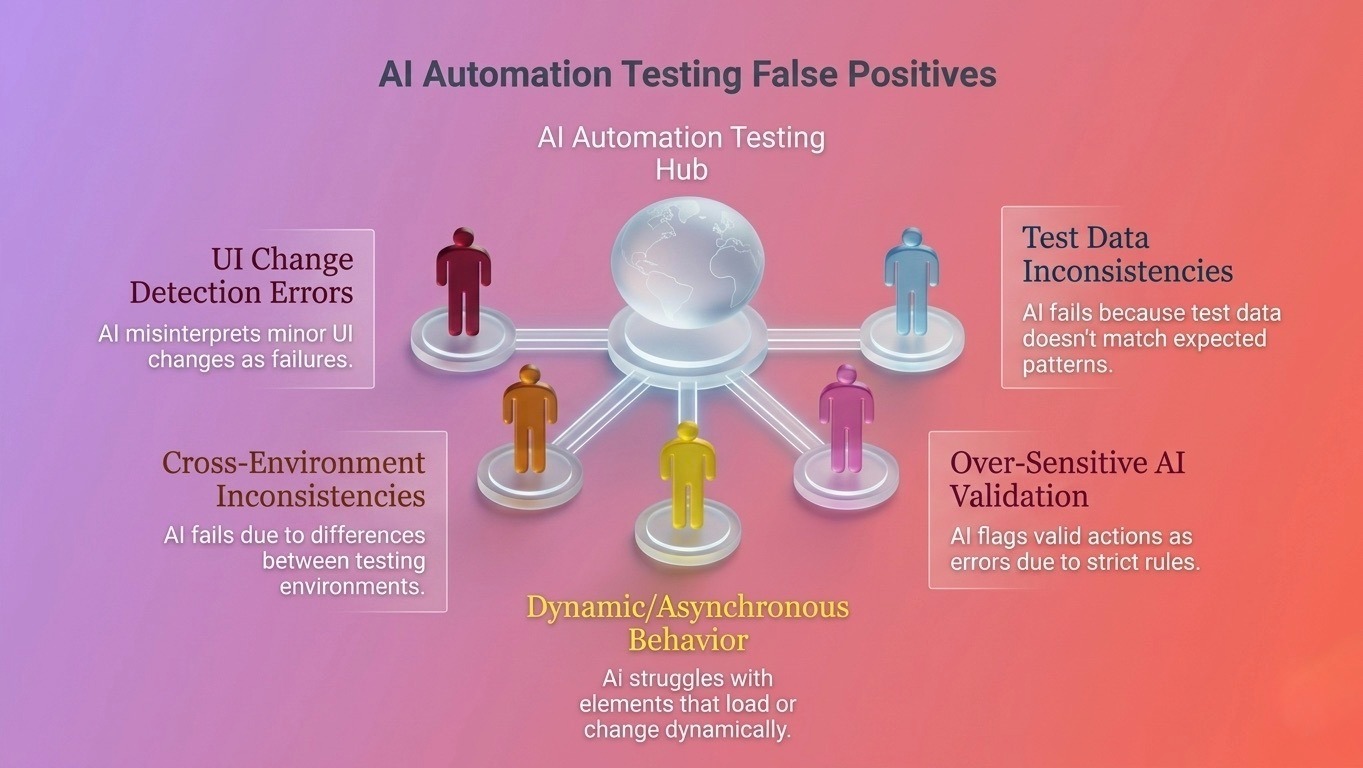
Top 5 AI false positives
Business impact of unreliable automation reports
Our teams at global app testing have seen false positives cause automation scripts to report success even when critical flows are broken. These misleading passes can result in customer loss and business success.
The following are the impacts of false positives in AI automation testing:
- Missed bugs in production: When automation reports a pass even though a feature is broken, defects can reach end users.
- Customer trust issues: Real problems that slip through automated tests can erode confidence in the product.
- Need for hotfixes and patch releases: Bugs that go unnoticed require urgent fixes, disrupting planned releases.
- Higher bug costs: Defects discovered in production are more expensive to fix than those caught earlier.
By pinpointing why AI tests generate false positives and refining automation, teams restore confidence. Recognizing these patterns helps minimize recurring test failures.
Strategies to reduce false positives in AI automation testing
QAs at global app testing ensure that AI automation tests are self-healing, support multiple browsers and OS checks, have consistent test data for local users, and use a mix of hard and soft assertions. These strategies reduce false positives and help make AI automation testing reliable.
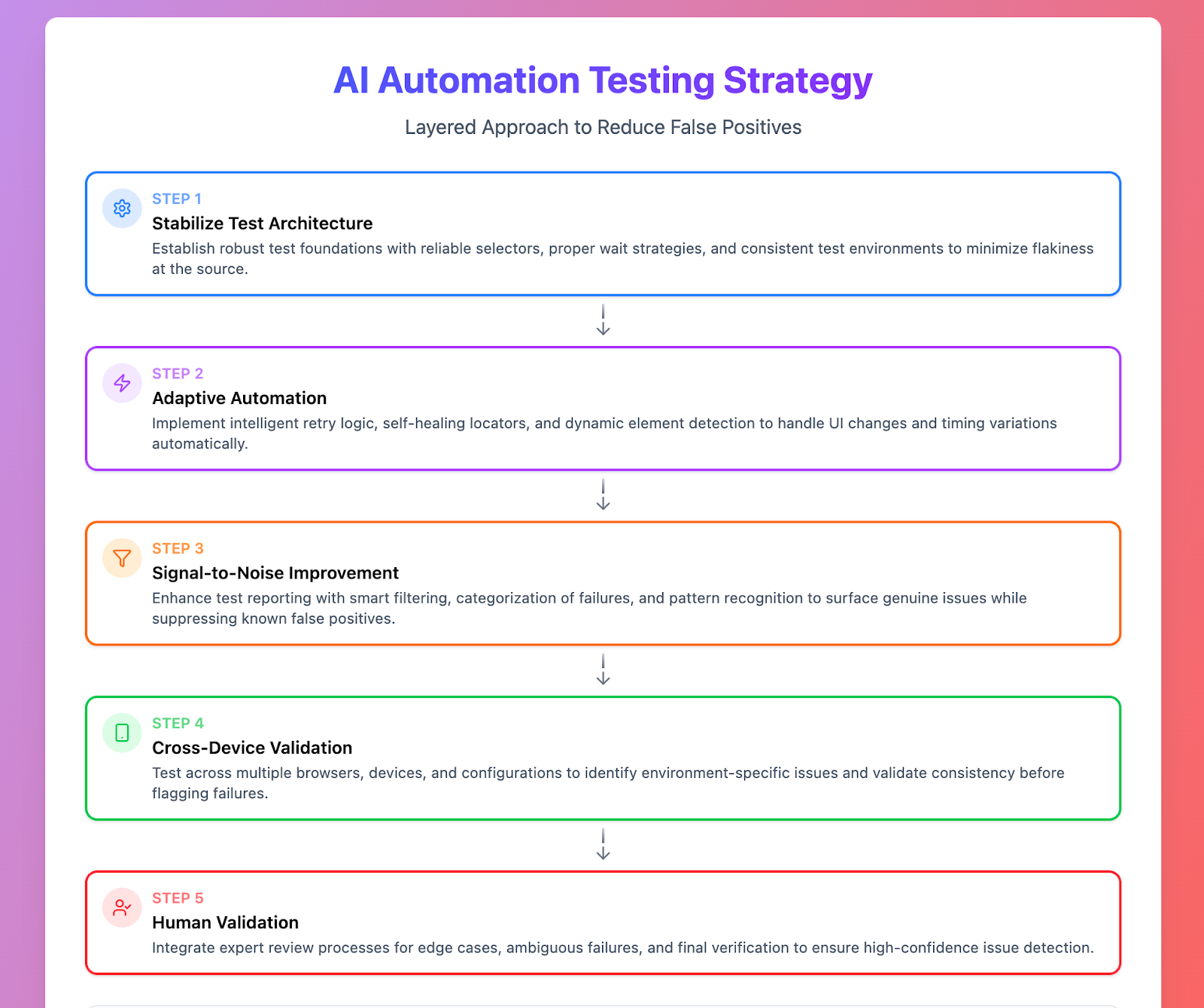 Reducing AI automation false positives
-
Below are a few strategies that we use to make our AI automation testing framework stable:
- Stabilize test architecture
- Use semantic attributes or dedicated test IDs instead of fragile CSS selectors/XPath.
- Build modular frameworks to reduce brittle logic.
- Replace hard-coded waits with condition-based synchronization.
- Example: In AI automation testing, the checkout flow uses data-test-id on the “Place Order” button to prevent failures caused by layout changes.
- Use adaptive and self-healing automation
- Detect UI changes automatically and update locators.
- Filter minor visual differences to focus on meaningful issues.
- Example: Applitools ignores small spacing shifts, preventing unnecessary UI test failures.
- Validate across real devices and environments
- Conduct cross-device, cross-browser, and OS testing to uncover environment-specific anomalies.
- Use human-generated AI test data for local languages rather than AI-generated test data.
- Example: In AI automation testing, the login form is tested on Chrome, Safari, and mobile devices to confirm consistent behavior.
- Combine automation with human validation
- Human testers provide context, exploratory insight, and validation for usability, localization, and accessibility.
- Example: Humans flagged culturally sensitive translations that automation alone missed.
Why human insight still matters in AI automation testing
Hybrid testing at Global App Testing pairs fast automation with human judgment. Machines can run extensive tests across multiple scenarios, while testers verify usability and real-world behavior to ensure reliable outcomes. This combination allows AI to cover scale and speed, while human insight catches issues automation might miss.
AI automation testing strengths include:
- Speed: Fast execution of repetitive and extensive test suites.
- Scale: Covers multiple workflows and environments efficiently.
- Regression validation: Detects changes that could break functionality across releases.
Human testing strengths are:
- Exploratory discovery: Uncovers unexpected issues automation may miss.
- UX and localization validation: Assesses usability and cultural context.
- Contextual judgment: Distinguishes real defects from false positives.
Automation flags potential issues, and human review confirms their real-world significance. Let’s now look at key metrics that enhance AI test reliability and automation performance.
Metrics that improve AI test reliability
Tracking false positives, flakiness, stability, and escaped defects helps teams quickly spot weak points and cut through noise. All of this ensures that AI-driven test results accurately reflect the real user experience.
Key metrics help teams identify weak points, reduce noise, and catch gaps in coverage.
|
Metric |
What it means |
Why it matters |
|
False positive rate |
Measures how often tests pass even when there is a real defect. |
High rates may mean automation is giving a false sense of quality. |
|
Test flakiness |
Highlights tests that inconsistently pass while defects exist. |
Flaky passes can hide real issues, reducing confidence in automation. |
|
Automation stability |
Ensures AI tests consistently report correct outcomes across environments. |
Unstable passes can mask real defects. |
|
Escaped defects |
Shows defects that went undetected despite a passing test. |
Monitoring this helps refine AI validation logic to catch real bugs. |
Analyzing test metrics allows teams to adjust validations, target key workflows, and preserve confidence in releases. This analysis drives targeted improvements that prevent instability from reaching users.
Key takeaways
- False positives occur when AI automation testing passes even though a real defect exists, often due to UI changes, environmental differences, timing issues, or outdated test data.
- They can give a false sense of security, allowing bugs to slip into production and reducing trust in automation results.
- Hybrid testing, combining AI-driven automation with human validation, helps catch real-world defects that automated tests alone might miss.
- Monitoring key metrics and using adaptive, self-healing frameworks helps teams focus on genuine issues rather than misleading passes.
- Cross-device validation, resilient locators, and context-aware AI tests improve reliability and ensure automated results reflect the true user experience.
Optimize your automation and catch real defects early. Partner with Global App Testing for reliable, AI-driven testing with human insight.