

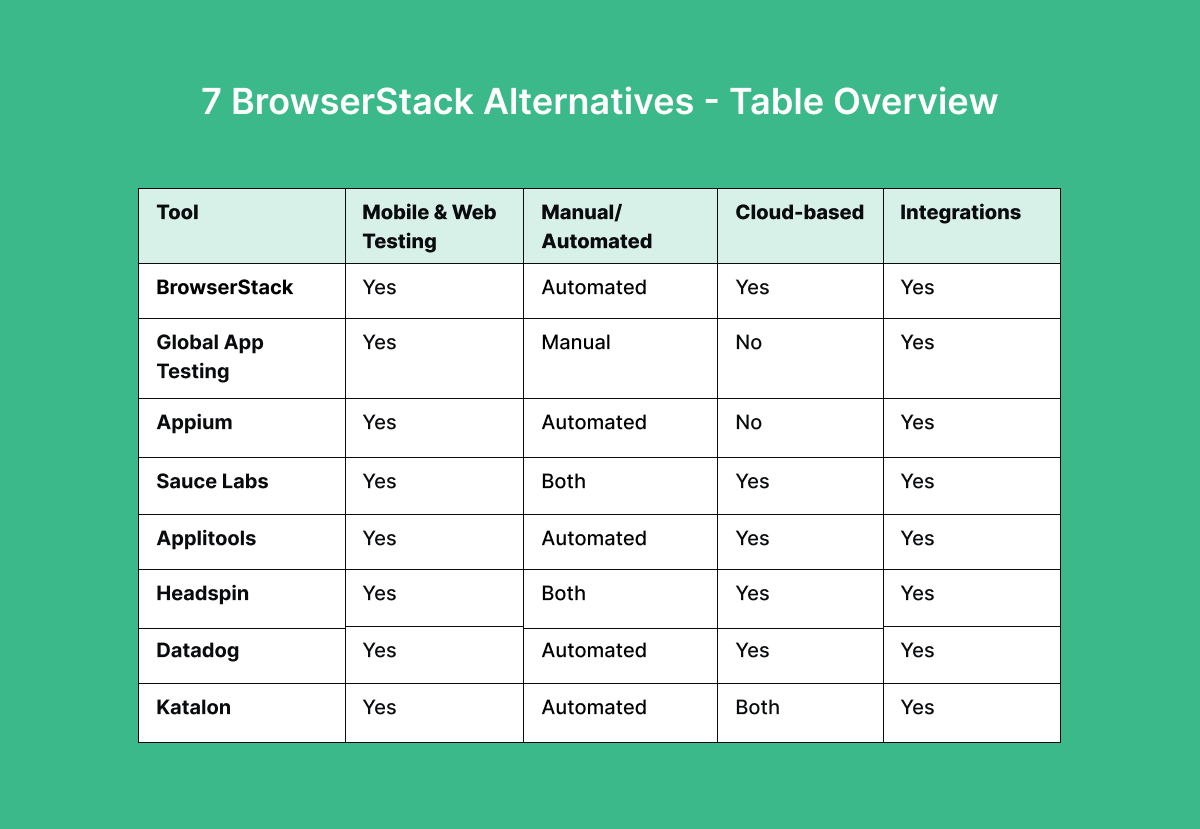
7 BrowserStack alternatives - table overview

BrowserStack – “App & Browser Testing Made Easy”
BrowserStack is a cloud-based testing tool that allows developers to test websites and mobile applications across different browsers and devices. It offers a wide range of real devices and virtual machines with various operating systems and browser versions to simulate different environments.
Key features
Some of the key features highlighted on the BrowserStack website are:
- Web testing: Allows users to run manual, visual, and automated tests on their web applications.
- App testing: Supports native mobile application testing on Android and iOS devices.
- Live testing: Allows for real-time, interactive testing of web and mobile applications across different devices and browsers.
- Automate testing: Offers automated testing capabilities, integrating with Appium, Espresso, XCUITest, and others.
- Security measures: BrowserStack implements security measures, including SOC 2 Type 2 compliance, CSA Star Level 1 and CSA Star Level 2 certifications, and GDPR compliance (General Data Protection Regulation 2016/679).
- Percy: Integration with visual AI engine Percy provides enhanced visual testing capabilities, highlighting UI issues and changes between releases.
- Accessibility testing: Allowing users to ensure their web and mobile applications can be used by everyone, regardless of their abilities.
- Test management: This service offers various test management capabilities, including a centralized dashboard for tracking test results across multiple projects.
- Test observability: Provides real-time visibility into test results, allowing users to identify and address issues quickly.
7 BrowserStack alternatives worth considering
1. Global App Testing – “Grow your product globally through best-in-class functional and UX testing.”

Check out Global App Testing! We are showcasing ourselves because we would be happy to be added to your supplier shortlist if you are looking for a BrowserStack alternative.
Global App Testing specializes in crowdtesting, providing a variety of testing services to assist developers in identifying application bugs and defects. With a global community exceeding 90,000 testers spanning 190+ countries and territories, we conduct tests on real devices and software environments. Utilizing our platform, you can distribute test cases to your target market and obtain results within 6-48 hours. Trusted by industry leaders such as Meta, Google, Booking.com, and more, Global App Testing delivers reliable and effective testing solutions.
Key features
General features:
- Real-world testing: Conducts real-world testing on various devices and software environments.
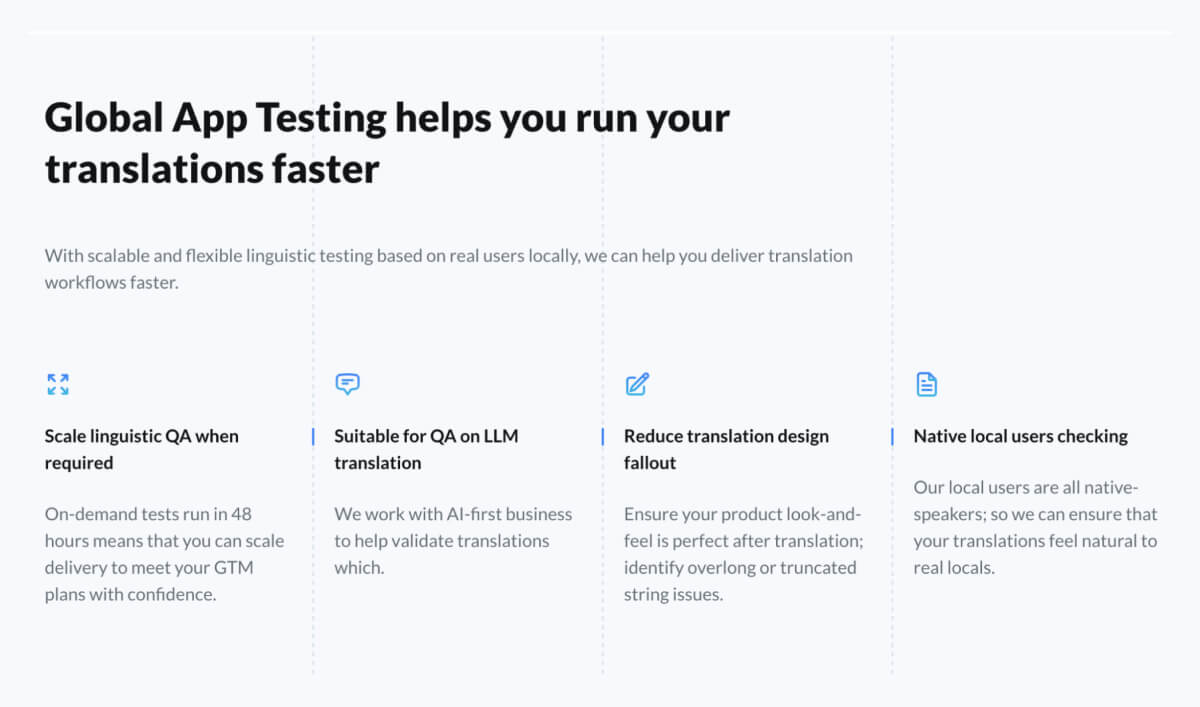
- Localization testing: We evaluate app performance across international markets to ensure local relevance and compliance.
- Test in various environments: Our services include testing in various environments to ensure compatibility and functionality.
- Cross-platform testing: Our testing spans various platforms such as websites, web applications, and mobile applications (iOS and Android).
- Bug reproduction: We offer validation and detailed reports on existing bugs, streamlining the fixing process for developers.
- Global app testing platform: With an easy-to-use interface, our platform provides detailed bug reports, test case results, and qualitative insights into the testing process.
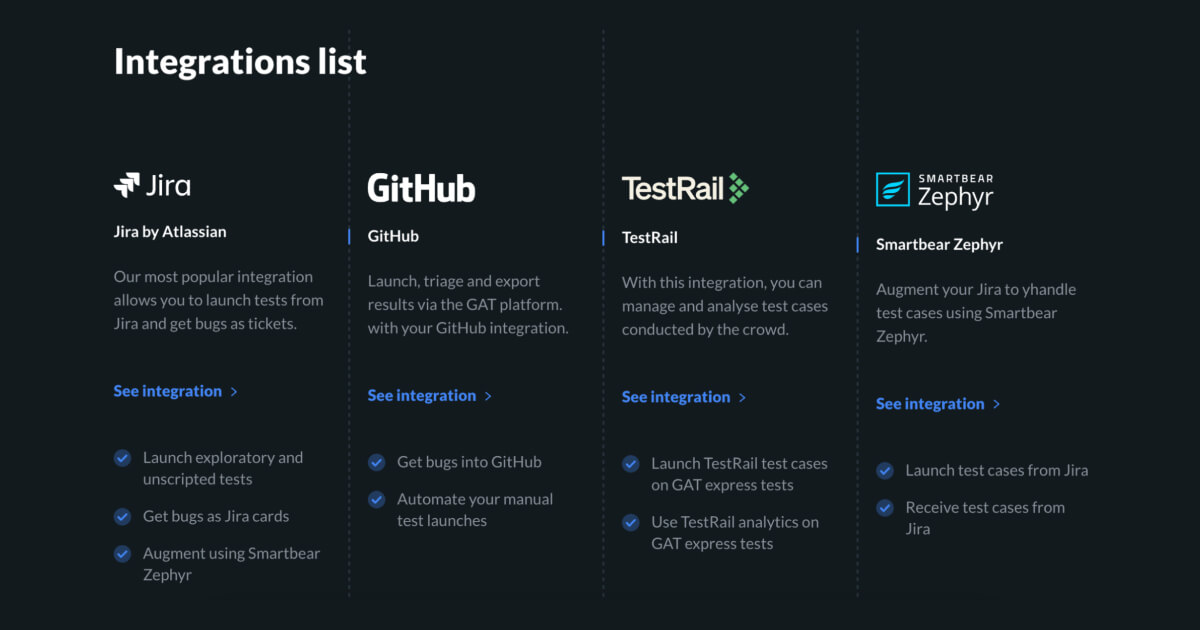
- Integrations: Easily integrate with your CI using our API, CLI, and Webhooks, and sync with popular project management tools like Jira, GitHub, TestRail, and more.
- Security measures: GAT implements a range of security measures to ensure compliance with GDPR and ISO27001 regulations, effectively addressing digital laws and standards.
- Comprehensive reporting: Clients receive reports detailing testing results, including graphical and video representations, to identify areas for improvement.
Testing types:
- Web app testing: Quality checks for web apps at any stage.
- Mobile app testing: Real-device testing for mobile apps, focusing on compatibility and performance.
- Functional testing: Tests significant functions with crowdsourced testing in any browser or operating system.
- Usability testing: Evaluates user experience across various devices and platforms.
- Accessibility testing: Led by WCAG-trained testers, including real impaired testers for diverse evaluations.
- Exploratory testing: Quick, ad hoc testing by experienced testers, providing results with videos and logs within 6-36 hours.
- Regression testing: Rapid quality assurance by dedicated QA engineers tailored to your product's maturity.
- Release testing: Ensuring the software release meets quality standards and is ready for deployment.
- Smoke & Sanity testing: Quick tests at the beginning of longer test sequences to decide if further testing is needed.
- IoT and device testing: Compatibility tests across various hardware, including IoT devices, smart TVs, and more.
- Translation testing: Verifying the accuracy and effectiveness of translations in the application.
- Competitor benchmarking: Comparing your product's features and performance with local competitors in the market.
2. Appium – “Designed to facilitate UI automation of many app platforms”
.png?width=1500&height=600&name=Untitled%20(1).png)
Appium is an open-source automation testing tool. It supports native, hybrid, and mobile web applications on iOS, Android, and Windows platforms. A key feature is its ability to test apps without code modifications.
Key features
Some of the key features highlighted on the Appium website include the following:
- Multiple language support: Appium facilitates test scripting and automation API using various programming languages such as Java, Python, Ruby, and Javascript.
- Test framework support: Integrates with popular test frameworks like JUnit and TestNG for efficient testing.
- UI elements locating: Appium enables easy identification and location of UI elements, enhancing testing efficiency.
- Emulation of user actions: Appium mimics user actions like swiping, tapping, typing, and rotating to assess mobile app functionality and usability.
- Continuous testing: Appium offers continuous testing capabilities, providing rapid feedback on product builds.
- Extensibility: It can be extended with additional modules or scripts to accommodate specific testing requirements.
An antidetect browser will help you hide your real browser configuration and present itself as a standard one, allowing you to bypass detection techniques. This can be useful for running tests in parallel or executing them on different browsers simultaneously.
3. Sauce Labs – “Website and mobile testing at every stage of development”
Sauce Labs is a cloud-based platform for automated testing of web and mobile applications. It provides a wide range of virtual devices and browsers to enable testing of applications in various environments.
Key features
Some of the key features highlighted on the Sauce Labs website include the following:
- Automated testing: Execute tests quickly and accurately on over 1000+ browser and OS combinations.
- Manual testing: Test with real, cloud-hosted, physical devices powered by real SIM cards.
- Analytics: Get real-time insights to test execution and monitor progress across different platforms to resolve issues quickly.
- Integration with CI/CD tools: Sauce Labs can be integrated with Continuous Integration/Continuous Deployment (CI/CD) tools for efficient testing within development pipelines.
- Security: Secure and reliable cloud testing with SOC 2 compliance and ISO 27001 certification.
- Sauce Low-Code: Automate testing with low-code scripting technology, eliminating the need for coding skills.
4. Applitools – “The All-In-One Next Generation AI-Powered Testing Platform”

Applitools is an AI-powered testing platform that mainly detects and diagnoses visual bugs and UI issues across browsers, devices, and screen sizes. It provides various automated testing and reporting features for web, mobile, and desktop applications.
Key features
Some of the key features highlighted on the Applitools website include the following:
- Visual AI testing: Uses patented visual AI technology to automatically detect visual bugs and other UI issues.
- Automated root cause analysis: Provides actionable insights into the root cause of bugs and visual regressions, saving time and increasing efficiency.
- Applitools platform: This platform offers autonomous testing with AI-powered end-to-end testing, ultrafast Eyes testing that enables front-end teams to focus on results, not just code, and Preflight for performance testing.
- Multiple test framework integrations: Integrates with 60+ frameworks, including Selenium, Appium, and Cypress, for easy test setup and execution.
- Accessibility testing: Offers advanced capabilities to detect and fix accessibility issues and provides comprehensive reports, allowing for quicker remediation in code.
- Self-healing tests: Uses AI to stabilize unstable tests, reducing flakiness automatically and time spent debugging, allowing for faster releases while assuring quality.
5. Headspin – “Optimize End Users’ Digital Experiences with Data Science Capabilities”

HeadSpin is a mobile performance management platform that provides real-world testing solutions for mobile apps and websites. With its global network of real devices and carrier networks, HeadSpin enables users to test, monitor, and optimize mobile experiences across different locations, networks, and devices.
Key features
Some of the key features highlighted on the Headspin website include the following:
- A cloud-based platform: Access to a cloud-based testing environment that eliminates the need for physical devices or emulator-based testing.
- Mobile and web app performance testing: Includes user experience, network performance, and device performance testing on mobile (Android and iOS) and web apps.
- Real-world testing: This involves testing on real devices in various networks, locations, and under real-world conditions, providing accurate results in a true-to-life scenario.
- Integrations: Integrates with popular bug tracking, collaboration, and continuous integration tools, enabling an end-to-end testing solution.
- AI-driven analysis: Advanced AI algorithms analyze results and provide actionable insights to automatically improve mobile app quality.
- Smart TV testing: Offers the ability to test Smart TV applications on various brands and models to ensure compatibility and performance.
6. Datadog – “Modern monitoring & security”

Datadog is a monitoring and analytics platform designed for cloud-scale applications encompassing web and mobile app testing. With its tools, organizations can monitor infrastructure performance, analyze application logs, and gain insights into user experience across web and mobile platforms.
Key features
Some of the key features highlighted on the Datadog website include the following:
- Monitoring: This service provides real-time monitoring of infrastructure, applications, and user experience, offering insights into performance metrics and trends.
- APM (Application Performance Monitoring): Gain visibility into application performance, including latency, errors, and dependencies.
- Synthetic monitoring: Monitor web and mobile app performance from various locations worldwide, simulating user interactions to identify and resolve issues.
- Real-user monitoring: This feature tracks user interactions with web and mobile applications in real-time, providing insights into performance and user experience.
- Infrastructure monitoring: Monitor the health and performance of infrastructure components, including servers, containers, and cloud services.
- Integrations: It offers more than 700 built-in integrations, making it easier to monitor and correlate data from across an entire stack.
7. Katalon – “Seamless test automation, supercharged by AI.”

Katalon is a company that specializes in testing and automation tools designed to streamline software application testing. Their premier offering, Katalon Studio, is a comprehensive solution that facilitates testing of web, mobile, and desktop applications.
Key features
Some of the key features highlighted on the Katalon website include the following:
- Katalon studio: The flagship product of Katalon, offering a comprehensive environment for testing web, mobile, and desktop applications.
- Visual testing: Perform visual testing to detect UI changes and ensure consistency across different browser versions and devices.
- Web testing: Test web applications with ease using Katalon Studio's robust features for automation, validation, and reporting.
- API testing: Automate API testing tasks and validate API responses for accuracy, performance, and security compliance.
- Mobile testing: Test mobile applications across various devices and platforms, ensuring functionality, usability, and performance.
- Desktop testing: Validate the functionality and performance of desktop applications across different operating systems and environments
BrowserStack alternatives at a glance
| Alternative | Best for | Pricing model | What it is |
|---|---|---|---|
| Global App Testing | Real-market payments, SMS, ID and localization | Project-based: scoped per engagement | Fully managed crowdtesting with 120,000 testers in 190+ countries |
| Sauce Labs | Enterprise device-cloud replacement | Subscription from $39/month | Real device cloud and browser testing with enterprise analytics |
| TestMu AI (formerly LambdaTest) | Low-cost browser testing | Subscription from $15/month | Browser and real-device cloud with AI testing tools |
| Appium with Firebase Test Lab or AWS Device Farm | Free open-source automation | Free, open source (self-hosted) | Open-source mobile automation paired with no-cost device runs |
| Applitools | Visual regression testing | Free tier; subscription from about $99/month | Visual UI testing and review tools |
| HeadSpin | Carrier-network performance testing | Contact sales | Real SIM-enabled device testing over carrier networks |
| Katalon | Consolidating web, API and mobile automation | Per-seat subscription, about $135/month | Automation platform across web, API, mobile and desktop |
Global App Testing is the only project-based option on this list. You pay for a scoped, managed engagement, while the others are subscriptions or free tools that your own team runs, so its price is best compared with the cost of staffing the project yourself.
1. Global App Testing
Global App Testing is the pick when the gap in your testing is people rather than devices. It's a fully managed crowdtesting service built for complex, high-stakes testing, so instead of renting you browser sessions, it puts real testers to work in the markets where you don't have staff. That's what you need when a payment has to settle on a local card, a one-time passcode has to arrive on a local carrier, or a KYC check needs a real ID document. Its testers complete 3DS and SCA challenges as real cardholders and pay with wallets such as PayPal, Apple Pay and Klarna and local methods such as iDEAL, Boleto and PIX.
The network has 120,000 professional testers and 1 million profiles across 190+ countries and territories, with 200,000+ device, OS and network combinations and 160+ languages between them. Because the service is managed, your team doesn't drive sessions or write scripts for in-market flows. You brief Global App Testing, its team sets up the cycle, and functional results come back in about 6 hours, with localization within 48 hours. Global App Testing is ISO 27001 certified and GDPR compliant.
Global App Testing works with product and engineering teams for whom a missed defect means lost revenue, a failed launch or a compliance problem. Each engagement is scoped to your products, markets and release schedule rather than sold as a one-size subscription, and it works alongside a device cloud that covers your automated regression and cross-browser testing.
Best for: teams that need real payments, SMS, ID checks and native-language review in markets they do not staff.
Skip it if: you need more parallel automation sessions or instant self-serve device access.
2. Sauce Labs
Sauce Labs is the closest like-for-like enterprise replacement for BrowserStack. It offers real device and browser testing with enterprise-grade analytics and error reporting, and its annual pricing starts at $39 a month for Live Testing, $149 for Virtual Device Cloud and $199 for Real Device Cloud. Month-to-month prices are $49, $199 and $249. Each tier includes one parallel test with unlimited users and minutes, and concurrency scales from 1 to 24 sessions by plan.
For regulated buyers, Sauce Labs holds ISO 27001, ISO 27701, SOC 2 Type II, SOC 3 and KY3P risk-management certification. Sauce Labs doesn't list a FedRAMP authorization, so teams with that requirement should confirm it directly. On price it's comparable to BrowserStack rather than cheaper, which makes it a fit when procurement wants a known enterprise vendor more than a lower bill.
Best for: enterprise teams that want a BrowserStack-style grid with a strong compliance set.
Skip it if: you need a lower bill or a confirmed FedRAMP authorization before purchase.
3. TestMu AI (formerly LambdaTest)
TestMu AI, formerly LambdaTest, has the lowest credible entry price in this group. The $15 a month Virtual Live plan, billed annually, buys unlimited interactive browser testing on 3,000+ desktop environments. It does not include real devices or automation. Real-device plans start at $39 a month for Real Device Plus Live and reach $199 for Real Device Plus Automation Cloud, covering 10,000+ real Android and iOS devices.
LambdaTest became TestMu AI on 12 January 2026, and accounts, configurations and integrations carried over. The product line is split across separately priced modules, including KaneAI, Test Manager, HyperExecute and SmartUI, and several have free tiers with limited allowances, so the $15 entry price and the eventual bill can sit far apart. Price the modules you'll actually use before you compare.
Best for: teams that want low-cost browser testing and can buy real-device modules separately.
Skip it if: you need the largest real-device fleet or predictable all-in pricing.
4. Appium with Firebase Test Lab or AWS Device Farm
Appium is free and open source, but it gives you automation without the devices to run it on. Once you add the infrastructure and the engineering time, Autonoma's cost model puts a self-hosted grid at $70,000 to $147,000 a year for a five-engineer team running a 200-test suite.
| Cost line | Modeled annual cost | Basis |
|---|---|---|
| Cloud VM infrastructure | $12,000 to $50,000 | Browser nodes and hub |
| Amortized setup engineer time | $14,000 to $25,000 | 3 to 4 engineer-months at $60 per hour |
| Ongoing test maintenance | $28,000 to $40,000 | 30 to 50 percent of automation budget |
| Flake-chasing triage | $16,000 to $31,000 | 20 minutes per flaky failure |
Two free options work well at small scale. Firebase Test Lab's Spark plan allows 10 virtual-device and 5 physical-device runs a day on an Android-heavy catalog. AWS Device Farm gives 1,000 free device-minutes, then $0.17 per device-minute or $250 a month per unmetered slot, with break-even near 1,470 device-minutes. Self-hosting suits teams that can own the infrastructure and need everything in-house, as long as they count the engineering time alongside the zero license fee.
Best for: engineering teams with capacity to run open-source infrastructure at small scale.
Skip it if: you need managed devices without hiring or maintaining grid engineers.
5. Applitools
Applitools is built for visual regression testing and handles baselines, versioning, environment diffs and branching without custom work. It doesn't execute your wider test suite, so it usually sits on top of a device cloud or grid.
The free tier gives roughly 100 visual checkpoints a month, enough to baseline a screen and see what changes without a credit card. Paid plans start around $99 a month and run about $99 to $199 a month for 5,000 to 10,000 checkpoints, or $500 to $1,500 for 25,000 to 100,000. Enterprise plans with unlimited checkpoints and dedicated infrastructure often exceed $25,000 a year. Cost scales with checkpoint volume, so a growing UI raises the bill the same way a growing suite raises BrowserStack's.
Best for: teams whose failures are visual and whose diff review eats time.
Skip it if: you are replacing execution infrastructure and still need a grid underneath.
6. HeadSpin
HeadSpin is for the release that passes every pipeline test and then fails on one carrier in one country. It offers 130+ performance KPIs and real SIM-enabled devices in 50+ global locations, tested over live carrier networks, which is why streaming, fintech and global apps turn to it when network behavior is the release risk.
Pricing is only available through sales, and reviewers describe the interface as cluttered on complex runs, but the network coverage is the reason to evaluate it. Keep in mind that each test is still a scripted session on a device HeadSpin owns, so it tells you how the app behaves on that network, while whether a person in the market completes the flow on their own plan and handset is a separate question.
Best for: teams where carrier and network conditions break releases.
Skip it if: you need a published price before procurement will consider a vendor.
7. Katalon
Katalon is an automation platform that spans web, API, mobile and desktop testing, with no-code and low-code options built on Selenium and Appium. It drives a device grid rather than supplying one. Entry seats start around $135 a month and Enterprise around $229, but the total can include several line items. True Platform and True Automation bundles run $700 to $1,699 per seat per year, while Runtime Engine and cloud execution packs bill separately at $1,749 and $1,899.
Because the licensing splits across several units, you'll need to model it before comparing it with a per-parallel price. Reviewers report slowness on larger projects, high memory use, crashes, and mobile testing that's less mature than the specialist tools. It earns its place for teams consolidating all their automation onto one platform, once the full license cost is clear.
Best for: teams consolidating automation across web, API, mobile and desktop.
Skip it if: the problem is device coverage or you need simple per-parallel pricing.
What BrowserStack does well, and what it costs
BrowserStack is a strong self-serve device and browser cloud, built for automated regression and cross-browser coverage across a large matrix. It offers 35,000+ real devices, 3,500+ browser combinations, Percy for visual testing, AI self-healing helpers, and mature Appium, Espresso and XCUITest integrations.
Its published plans start low, but every Automate price below buys a single parallel session.
| Plan | Published price | Scope |
|---|---|---|
| Live Desktop | $29/month | Manual interactive testing, annual billing |
| Live Desktop & Mobile | $39/month | Manual interactive testing, annual billing |
| Freelancer | $12.50/month | 100 minutes, 1 user |
| Automate Chrome | $59/month | 1 parallel |
| Automate Desktop & Mobile | $175/month | 1 parallel |
| Automate Desktop & Mobile Pro | $225/month | 1 parallel, real-device features, AI agents |
Team plans for five or more users run $150 to $375 a month, and Vendr buyer data puts the median BrowserStack contract at $14,032 a year once teams add the concurrency they need. BrowserStack holds ISO 27001:2022, ISO 27701:2025, ISO 42001:2023 and SOC 2 Type II. The complaints reviewers raise most are lag between a click and the remote device, and costs that climb quickly once parallel runs are added to a real CI setup.
Device cloud or crowdtesting: which do you need?
A device cloud rents your team browsers and real devices to run its own tests on, while crowdtesting sends people in a given market to use the product the way a customer would. They answer different questions, so it helps to know which one you're asking before you compare vendors.
If the flow you're worried about depends on a local payment that has to settle for real, such as iDEAL, Boleto or PIX, or an OTP that has to arrive on a local carrier, you need people in that market. The same goes for a market where nobody on your team speaks the language or holds a local account. If what you need is 24 parallel sessions on every pull request, you need a grid.
A crowd won't give you CI parallelism, and a grid can't tell you whether a real person completed a payment, passed a KYC check or found the localized screens natural, which is why the two so often run side by side.
Frequently asked questions
Which BrowserStack alternative can test real payments, SMS and ID checks?
Global App Testing. It's a managed crowdtesting service whose testers complete payments with their own cards and local methods, receive OTPs on their own local SIMs and carriers, and run KYC and liveness checks with real documents, across 190+ countries. Device clouds such as Sauce Labs and TestMu AI simulate or sandbox these flows rather than completing them for real.
What is the difference between a device cloud and crowdtesting?
A device cloud rents machines so your team can run its own scripts. Crowdtesting puts real people on their own devices, SIMs and carrier networks to use the product the way a customer would. Device clouds are built for automation and parallelism, and crowdtesting brings human judgment to markets where your team has no local presence.
How much does Global App Testing cost, and how fast are results?
Global App Testing is scoped to your products, markets and release schedule and quoted per engagement, because it's a fully managed service rather than rented infrastructure, so there's no monthly subscription or per-parallel unit. Functional runs return results in about 6 hours, and localization within 48 hours.
What is the best free alternative to BrowserStack?
Firebase Test Lab and AWS Device Farm are the strongest free starting points. Firebase Test Lab's Spark plan allows 10 virtual-device and 5 physical-device runs a day on an Android-heavy catalog. AWS Device Farm provides 1,000 free device-minutes, then charges $0.17 per device-minute or $250 a month per unmetered slot.
What is the cheapest BrowserStack alternative?
TestMu AI has the lowest published entry price at $15 a month for its Virtual Live plan on annual billing. This covers unlimited interactive browser testing on 3,000+ desktop environments. It does not include real devices or automation. Real-device plans start at $39 a month and rise to $199 for automation cloud access.
If your next release depends on real people in real markets checking payments, SMS, ID or localization, speak to Global App Testing about scoping an engagement.
How do you choose the best BrowserStack alternative?
Appium, Sauce Labs, Applitools, headspin, Datadog, and Katalon are worthy BrowserStack alternatives, but choosing the right one depends on your requirements. Global App Testing provides benefits such as an integrated platform, rapid service, global feedback, comprehensive assurance, and additional resources:
- Efficient integration: Global App Testing offers a streamlined platform that integrates into your development workflow for optimized efficiency.
- Centralized management: Easily oversee testing projects, track progress, and communicate with testers through a centralized dashboard, fostering collaboration.
- Rapid results: We are committed to swift delivery and provide test results within 6-48 hours, even for urgent testing needs, ensuring reliability.
- Global testing community: Access a diverse pool of over 90,000 testers from 190+ countries, providing comprehensive testing coverage and diverse perspectives.
Interested in hearing more? Sign up now and schedule a quick call today to explore further!